Cooling fan mounting plate generator (STL, STEP, DXF)
Type your fan size (such as 80 mm fan plate) to compile a mounting plate with the centre circular opening and four corner mounting holes, ready for 3D printing or laser cutting.
1 free generation without an account, then 1 per day once you sign in. Parameter edits are always free.
STEP, shop drawings, and outline upload come with credit packs and Pro.
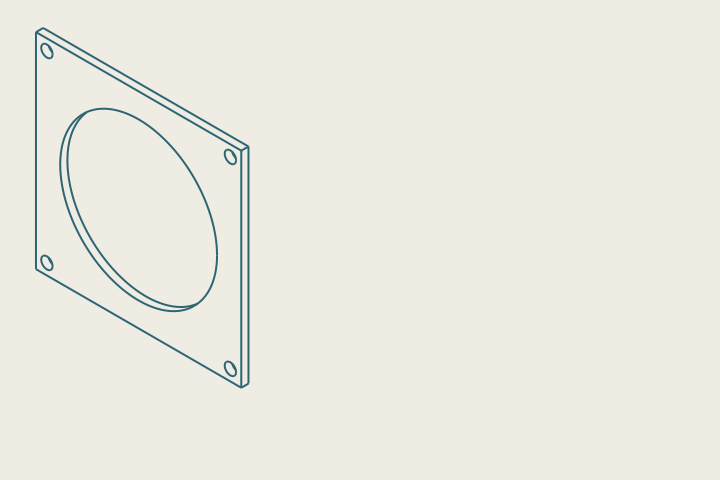
Cooling Fan Plate · example · press BUILD SOLID
SCROLL TO ZOOM · DRAG TO PAN
Cooling Fan Plate · drag to rotate · press BUILD SOLID
Key dimensions and prompt parameters
Every millimetre value in your sentence goes straight into Cad Bot’s deterministic OpenCascade compiler. Start with the preloaded prompt above, change any size, or adjust dimensions afterward with free slider rebuilds.
| Parameter | Example value | Notes |
|---|---|---|
| Fan size | 80 mm (or 40 / 60 / 120 mm) | Standard square axial fan footprint |
| Centre opening | Circular airflow cutout | Sized to match the fan blade sweep |
| Corner holes | 4× corner mounting holes | Standard square fan screw pattern |
| Export formats | STL, STEP, DXF/DWG | Print flat with no supports or cut from sheet |
3D printing and CAD export notes
Fan plates print flat in under 30 minutes with no supports. Use 3 mm or thicker plates for 120 mm fans to reduce vibration.
Every build exports STL for 3D printing (free tier), plus STEP for Fusion 360 / SolidWorks / FreeCAD and an ISO A4 three-view DXF / DWG shop drawing on credit packs and Pro. Not sure which file to pick? Read STL vs STEP vs 3MF.
Related CAD part generators
- Mounting Plate generator — Plates & Brackets
- Electronics Project Box generator — Enclosures & Cases
- Raspberry Pi Case generator — Enclosures & Cases
- L-Bracket generator — Plates & Brackets
- Browse all 1,500+ named parts in the compiler catalog
- AI CAD generator · Text to CAD home
Cooling Fan Plate generator questions
What fan sizes can I generate with the fan plate tool?
You can specify standard axial fan sizes such as 40 mm, 60 mm, 80 mm, or 120 mm fan plates in plain English. Cad Bot builds the square plate, central airflow bore, and four corner mounting holes to exact dimensions.
Can I change the thickness of the fan plate after generating?
Yes. Use the dimension sliders below the 3D viewport to adjust plate thickness or outer dimensions and recompile the solid for free without spending another generation.
Is the cooling fan plate generator free?
The free tier (1 without an account, then 1 per day once you sign in) downloads STL. STEP, DXF, DWG, SVG, and PDF, and outline upload, are on credit packs and Pro. Parameter edits are free.