L-bracket generator: custom STL, STEP, and DXF
Type the two leg lengths, bracket width, wall thickness, and any mounting holes. Cad Bot compiles an exact 90° L-bracket solid in OpenCascade and exports STL, STEP, and an ISO A4 shop drawing.
1 free generation without an account, then 1 per day once you sign in. Parameter edits are always free.
STEP, shop drawings, and outline upload come with credit packs and Pro.
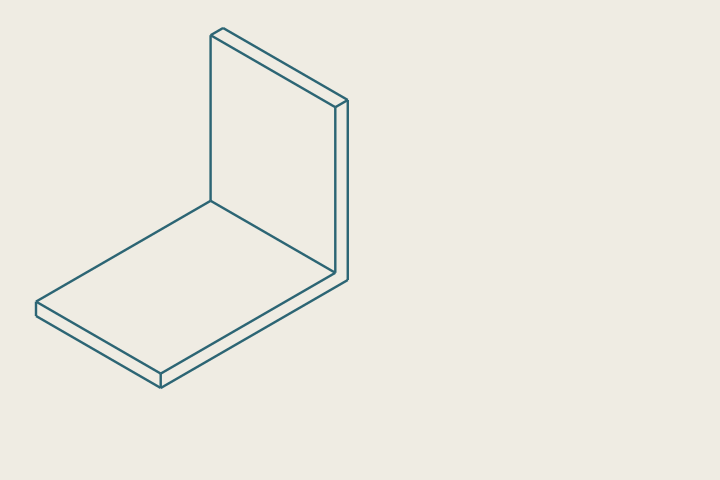
L-Bracket · example · press BUILD SOLID
SCROLL TO ZOOM · DRAG TO PAN
L-Bracket · drag to rotate · press BUILD SOLID
Key dimensions and prompt parameters
Every millimetre value in your sentence goes straight into Cad Bot’s deterministic OpenCascade compiler. Start with the preloaded prompt above, change any size, or adjust dimensions afterward with free slider rebuilds.
| Parameter | Example value | Notes |
|---|---|---|
| Bracket width | 40 mm | Extrusion width along the bend axis |
| Horizontal / vertical legs | 50 mm × 60 mm | Outer leg lengths measured from the corner |
| Wall thickness | 4 mm | Minimum 0.8 mm for printability; 3–6 mm typical for PLA/PETG |
| Mounting holes | Optional M4 / M5 clearance | Add hole size and spacing in plain English |
3D printing and CAD export notes
Print an L-bracket on its side (L-profile flat on the build plate) so layer lines wrap around the 90° corner rather than shearing along the bend. Use 4+ perimeters for structural loads, or export STEP to add gussets in Fusion 360 or SolidWorks.
Every build exports STL for 3D printing (free tier), plus STEP for Fusion 360 / SolidWorks / FreeCAD and an ISO A4 three-view DXF / DWG shop drawing on credit packs and Pro. Not sure which file to pick? Read STL vs STEP vs 3MF.
Related CAD part generators
- Mounting Plate generator — Plates & Brackets
- NEMA 17 Motor Mount generator — Mounts & Robotics
- Servo Mounting Bracket generator — Mounts & Robotics
- Wall Hook generator — Desk & Workshop Prints
- Browse all 1,500+ named parts in the compiler catalog
- AI CAD generator · Text to CAD home
L-Bracket generator questions
How do I generate a custom L-bracket STL or STEP file?
Type the leg lengths, width, and thickness of your L-bracket into the Cad Bot prompt box and click Build Solid. Cad Bot compiles an exact B-rep solid and lets you download STL on the free tier or STEP and DXF shop drawings on credit packs and Pro.
Can I adjust L-bracket dimensions after generating?
Yes. After Cad Bot builds your L-bracket, parameter sliders appear below the preview so you can change width, leg lengths, or thickness and recompile the solid for free without using another AI generation.
Is the l-bracket generator free?
The free tier (1 without an account, then 1 per day once you sign in) downloads STL. STEP, DXF, DWG, SVG, and PDF, and outline upload, are on credit packs and Pro. Parameter edits are free.