Best AI 3D model generator in 2026: pick by the file you need
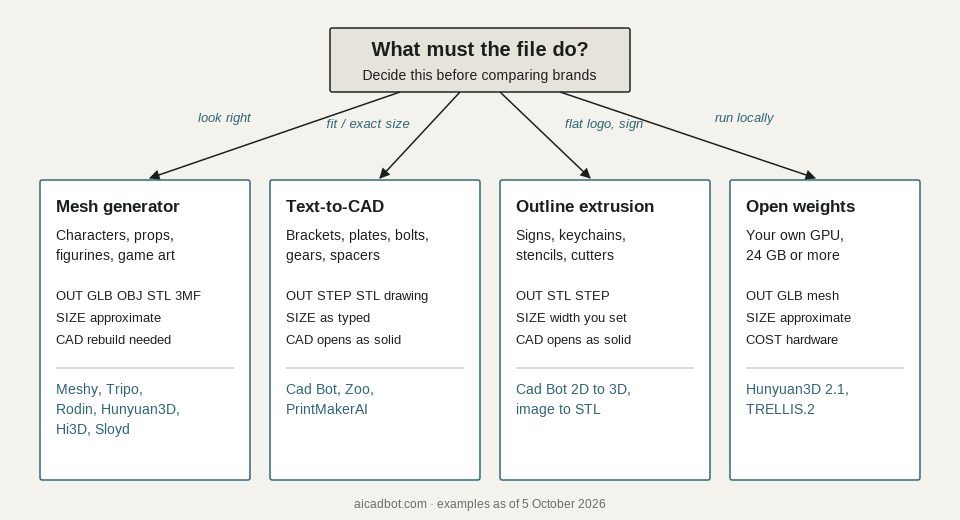
The best generator for a dragon figurine is the wrong one for a bracket with four M5 holes, and the reverse is just as true. This guide sorts the main AI 3D tools by what they output, what the free tier really allows, and who may use the result, then says which kind fits games, 3D printing and CAD.
Disclosure. Cad Bot (this site) is one of the tools listed, and it only wins a narrow set of jobs. We have not run our own benchmark of the mesh generators. Every figure below comes from the vendor’s own page, an open-source repository, or a public arena, linked under Sources, and was checked on 5 October 2026. Prices and limits change often.
Short answer
- Characters, props, game assets: a text or image to mesh generator. Meshy, Tripo, Hunyuan3D and Rodin trade the top spots in blind votes; try two on your own reference image.
- Figurines and decorative 3D prints: a mesh generator that exports STL or 3MF (Meshy does multi-colour 3MF), then repair the mesh before slicing.
- Functional prints and parts with exact sizes: a text-to-CAD tool. Cad Bot compiles a STEP and STL with the numbers you typed; Zoo exports STEP from a prompt.
- Free and local, with a big GPU: Hunyuan3D 2.1 or Microsoft TRELLIS.2 (MIT licence).
Why the “best” rankings disagree
Most rankings come from arenas where people vote between two anonymous models. They are useful, but they measure something specific:
- The Top 3D AI arena’s current season puts Meshy 7 first at 1084 Elo, with Hi3D, Seed3D, Tripo v3.1 and Lychee within 16 points. Several leaders have under 100 votes, so the order is not settled.
- Sloyd’s write-up of the same arena on 3 August 2026 had Tripo v3.1 first at 1042. Two months moved the top spot.
- The 3D Arena paper (123,243 votes from 8,096 users) found textured models beat untextured geometry by 144 Elo and that votes reward surface appearance. The authors state plainly that the platform measures presentation, not accuracy.
- Many “best of” lists are written by a vendor that ranks itself, including 3D AI Studio, Sloyd and Tripo’s own blogs. This page is no exception, which is why it gives no overall winner.
So an arena tells you which tool makes the nicest-looking model from a typical prompt. It does not tell you whether the mesh is printable, whether a 40 mm hole spacing is 40 mm, or whether you can sell the result.
The main tools compared
| Tool | Kind | Output | Free tier (5 Oct 2026) | Free-plan rights | Best at |
|---|---|---|---|---|---|
| Meshy | Text / image to mesh | GLB, STL, multi-colour 3MF and other mesh formats | 100 credits a month | CC BY 4.0 (attribution); paid plans own assets | Textured assets, colour prints, full pipeline incl. rigging |
| Tripo | Text / image to mesh | Common mesh formats incl. STL | Basic plan with monthly credits | Public, labelled CC BY 4.0; confirm terms before commercial use | Fast image-to-3D, low-poly “Smart Mesh” |
| Hyper3D Rodin | Image / text to mesh | Mesh, quad or triangle; high polycount | Generate free, pay per download | Limited on free; paid plans allow any use | Detailed geometry, multi-image input |
| Hunyuan3D (Tencent) | Text / image / sketch to mesh; open weights | GLB, OBJ | Reported 20 a day on the web app; 2.1 weights free to run | Community licence; not valid in EU, UK, South Korea | Quality for free, self-hosting |
| TRELLIS.2 (Microsoft) | Image to mesh; open weights | GLB with PBR textures | Free to run; needs a 24 GB GPU | MIT | Local and research use |
| Sloyd | Parametric templates plus AI | GLB, OBJ | 1 AI generation a day | Personal use only | Game-ready props under 200k polygons |
| Zoo Text-to-CAD | Text to CAD | STEP (B-rep), STL, OBJ, GLB and more | Monthly free compute allowance | See Zoo terms | Mechanical parts you describe feature by feature |
| Cad Bot | Text to CAD compiler | STEP, STL, ISO drawing as DXF, DWG, SVG, PDF | 3 generations a day signed in | See terms | Catalog parts (brackets, plates, fasteners, gears) at exact sizes |
Free tiers in the table are the vendors’ own figures except Hunyuan3D’s daily allowance, which is reported by third parties. Paid plans start around US$15–30 a month for the hosted mesh tools.
Which one to pick
Games, characters and concept art
Use a mesh generator and judge it on what the arena does not show: topology for rigging, polygon count, UV and texture quality, and how many retries a usable result takes. Rodin aims at very high polycounts that you retopologise; Tripo and Sloyd lean toward light, game-ready meshes; Meshy covers texturing, rigging and animation in one place. Run the same reference image through two of them; your subject decides more than any list.
3D printing: figurines and decorative parts
A mesh generator is the right tool, but plan for repair. Meshy’s own help centre explains that its models can print hollow because the mesh is non-manifold or made of zero-thickness surfaces, and recommends Blender’s 3D Print Toolbox “Make Manifold”, a Solidify modifier and recalculated normals. Meshy can also export a multi-colour 3MF that opens with filament colours assigned in Bambu Studio, OrcaSlicer or PrusaSlicer.
3D printing: functional parts
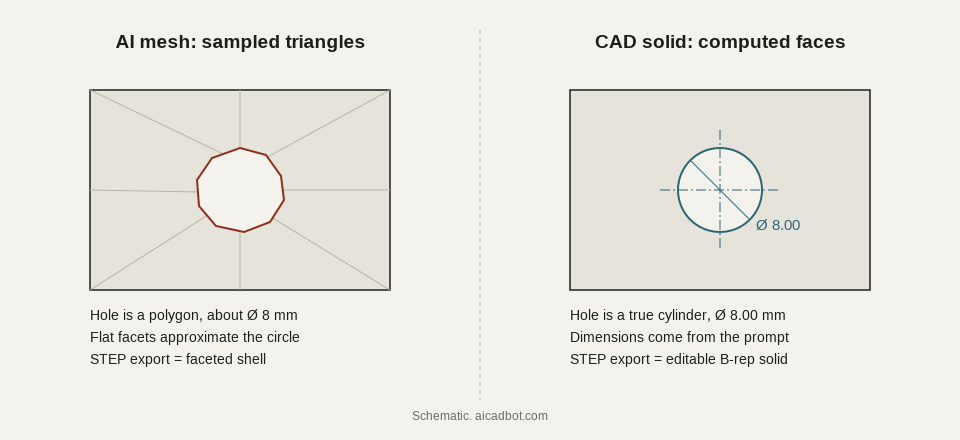
A spacer, a wall plate with holes, a bracket or a bolt has to fit something. A mesh generator gets the look close; it does not hold “8 mm hole, 40 mm apart”. A text-to-CAD tool builds the solid from those numbers, so the STL is watertight and the holes land where you said. For a flat logo or sign, image to STL extrudes your outline at an exact width.
Parts you will machine, fit or edit in CAD
You need a B-rep solid, not triangles. A mesh converted to STEP is still a faceted shell. Cad Bot and Zoo both produce STEP that opens with real faces. Zoo works best when you describe the feature tree; Cad Bot compiles named parts from its parts catalog and refuses the rest rather than emitting a lookalike.
Running it yourself
Hunyuan3D 2.1 needs about 10 GB of GPU memory for shape alone and 29 GB with texture; TRELLIS.2 lists 24 GB as a minimum. Check the Hunyuan3D licence territory before you use it from Europe, the UK or South Korea.
Roblox and other game platforms
These take meshes, so use a mesh generator and clean up in Blender. Check the platform’s current rules on AI-generated assets and triangle limits before uploading.
A ten-minute test before you pay
- Write the one requirement that matters (“hole 8 mm, 40 mm apart”, “under 10k triangles”, “prints without supports”). If a tool cannot hold it, it is the wrong kind of tool for this job.
- Open the export in your real target: slicer, CAD program or game engine. A turntable preview proves little.
- Count retries, not just the best result. Credits are spent on the misses too.
- Read the free-plan licence if the model will ship in a product or be sold.
Where Cad Bot fits
Cad Bot is not a general 3D generator and does not compete for characters or scenes. It is the better pick when your sentence contains measurements and the result must be a solid you can print or take into CAD. The difference is explained in compiled CAD vs AI mesh, and what it will and will not build is in the compiler fact sheet.

Generate a part · What is text to CAD?
Sources
- Top 3D AI leaderboard (current season, accessed 5 Oct 2026)
- Sloyd: AI 3D model generator rankings (3 Aug 2026)
- 3D Arena: An Open Platform for Generative 3D Evaluation
- Meshy pricing and licence · Meshy: fixing a hollow model for 3D printing · Meshy multi-colour printing
- Tripo pricing
- Hyper3D Rodin pricing
- Hunyuan3D 2.1 repository and licence
- TRELLIS.2 repository
- Sloyd pricing
- Zoo: Introducing Text-to-CAD
Questions about the best AI 3D model generator
What is the best AI 3D model generator?
There is no single winner. Public blind-vote arenas put Meshy, Tripo, Hunyuan3D and a few newer models within a few dozen Elo points of each other, and the order changes between seasons and sites. Pick by output: a text or image to mesh generator for characters, props and figurines; a parametric tool for game-ready props; a text-to-CAD tool such as Cad Bot or Zoo when the part needs exact dimensions or a STEP file.
Which AI 3D model generator is free?
Most have a free tier with limits. As of 5 October 2026: Meshy gives 100 credits a month; Tripo has a free Basic plan whose models are public; Hyper3D Rodin lets you generate before paying per download; Sloyd allows one AI generation a day for personal use; Tencent's Hunyuan3D site is reported to allow 20 a day. Hunyuan3D 2.1 and Microsoft TRELLIS.2 are open weights you can run yourself if you have a GPU with roughly 24 GB of memory or more.
Can I sell models made on a free plan?
Check each licence. Meshy states that free-plan assets are licensed CC BY 4.0 (commercial use with attribution) and paid-plan assets belong to you. Tripo labels free-plan models CC BY 4.0 and public, but its terms have been reported to reserve broader rights, so confirm before shipping. Sloyd's free tier is personal use only. Hunyuan3D 2.1's community licence does not apply in the EU, UK or South Korea.
Which AI 3D generator is best for 3D printing?
For figurines and decorative prints, a mesh generator such as Meshy, which exports STL and multi-colour 3MF for Bambu Studio and similar slicers. Expect to repair the mesh: AI meshes are often non-manifold or have zero-thickness surfaces. For functional prints with stated sizes, such as a bracket, spacer, plate or bolt, use a text-to-CAD tool so the dimensions are in the solid.
Can an AI 3D model generator make a STEP file?
Mesh generators export triangles (GLB, OBJ, FBX, STL). Converting that to STEP gives you a faceted shell, not editable faces. Text-to-CAD tools such as Cad Bot and Zoo build a B-rep solid, so the STEP opens in SolidWorks, Fusion or FreeCAD with real planar and cylindrical faces.