Best AI 3D model generator for 3D printing: figurines vs functional parts
A model that looks good in a browser can still slice as a hollow shell, lose a 0.3 mm wing on the first layer, or come out 4 mm too small for the bolt it was meant for. For printing, the right AI tool depends on one question: does the part only need to look right, or does it need to fit something?
Disclosure. Cad Bot (this site) is one of the tools below. There is no independent benchmark of how printable AI meshes are; even a competitor’s comparison says it looked for one and found none. We have not run our own. Figures come from each vendor’s page or the sources listed at the end, checked on 5 October 2026.
Short answer
- Figurines, decor, cosplay props: Meshy. It checks watertightness and non-manifold edges before export, repairs broken meshes, and exports STL, OBJ and multi-colour 3MF.
- On a Bambu Lab printer: MakerWorld’s MakerLab runs Meshy’s generator in the browser, and PrintU turns a photo into a stylised figure. Both spend MakerWorld credits.
- Tabletop miniatures with fine detail: Hi3D (formerly Hitem3D) generates at 1536³ with up to 2M faces and can split a model for printing.
- Parts that must fit (brackets, spacers, plates, bolts, gears): a text-to-CAD tool. Cad Bot compiles an STL and STEP with the dimensions you type; Zoo and PrintMakerAI also build B-rep solids.
What makes an AI model printable
Check these five things before blaming the printer:
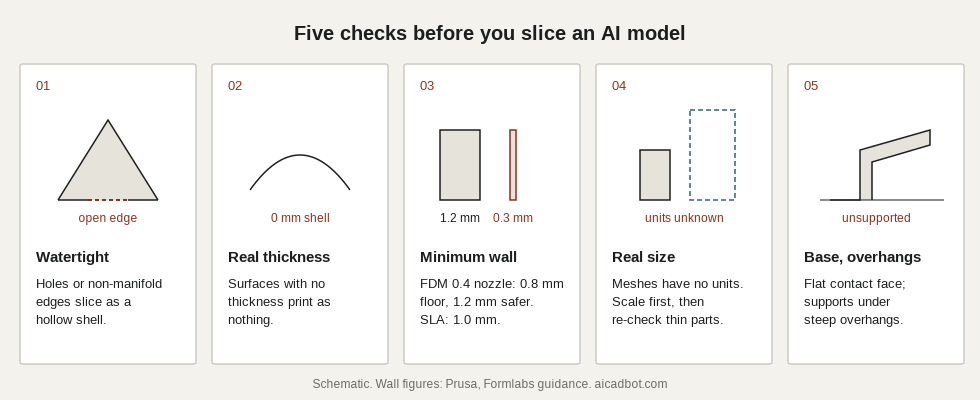
- Watertight and manifold. The slicer needs a closed surface to compute walls and infill. Open edges and non-manifold geometry are the most common reason an AI model prints hollow.
- Real thickness. Some generators output surfaces with no thickness at all. They may pass a manifold check and still print as nothing.
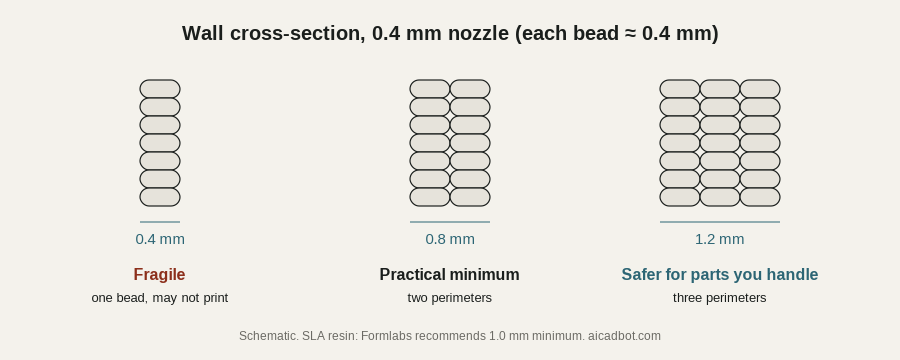
- Minimum wall. On FDM with a 0.4 mm nozzle, about 0.8 mm is the practical floor and 1.2 mm is safer for parts you handle. Formlabs recommends 1.0 mm on SLA resin. AI tools do not know these limits.
- Real size. A mesh has no inherent units. Scale it in the slicer and re-check thin details at the final size.
- A flat base and sane overhangs. Organic models usually need supports; a flat contact face saves a failed first layer.
The tools compared for printing
| Tool | Print exports | Print-specific features | Free tier and rights | Fits |
|---|---|---|---|---|
| Meshy | STL, OBJ, 3MF | Watertight and non-manifold checks, auto repair, multi-colour (Bambu AMS, Creality CFS), auto-split onto the plate, slicer integrations | 100 credits a month; CC BY 4.0 on free plan | Figurines, decor, colour prints |
| Bambu MakerLab | 3MF into Bambu Studio | Meshy text and image to 3D; PrintU stylised figures from a photo | MakerWorld credits (PrintU: 10 per run), earned through site activity | Bambu owners, quick gifts and figures |
| Tripo | STL, 3MF, OBJ, GLB, FBX | Smart segmentation splits a model into parts | Free Basic plan; models public, check terms for commercial use | Fast image-to-3D, organic detail |
| Hi3D (Hitem3D) | STL and mesh formats | 1536³ generation, up to 2M faces, model splitting | Trial credits; commercial rights on paid plans | Miniatures, high detail |
| Hyper3D Rodin | Mesh formats | Very high polycount, multi-image input | Generate free, pay per download | Detail, if you decimate before slicing |
| Cad Bot | STL, STEP, ISO drawing | Solid built from your numbers; watertight check, estimated min wall (0.8 mm), overhang warning past 45° | 3 generations a day signed in | Catalog parts at exact size |
| Zoo Text-to-CAD | STEP, STL and more | B-rep solid; best when you describe features | Monthly free compute allowance | Mechanical parts |
| PrintMakerAI | STL, STEP | Generates CadQuery code that builds a B-rep solid | Free starter tier (vendor figure) | Functional parts |
Decorative prints: mesh generators
For anything organic, a mesh generator is the right tool and the arena leaders are close in quality (see the main comparison). For printing, Meshy currently ships the most print tooling: it flags holes and non-manifold edges before export, offers automatic repair, splits large models into watertight parts, and turns textures into colour regions for a multi-colour 3MF. Tripo and Hi3D both split models into parts too; Hi3D’s higher resolution matters most for 28–32 mm miniatures. Rodin’s very dense meshes look excellent but slow slicers down, so decimate first.
On Bambu Lab printers, MakerLab is the shortest path: the generator runs inside MakerWorld and the 3MF lands in Bambu Studio. A hands-on test of PrintU found the colour mapping needed manual touch-up before it printed well, so budget a few minutes in the slicer.
Functional prints: text-to-CAD
Coverage of Meshy’s MakerWorld launch put the limit plainly: mesh generation suits a standalone ornament or character, not a bracket that must fit specific holes or a gear with exact teeth. That is not a flaw in one tool; a mesh model samples a shape, it does not compute one from numbers.
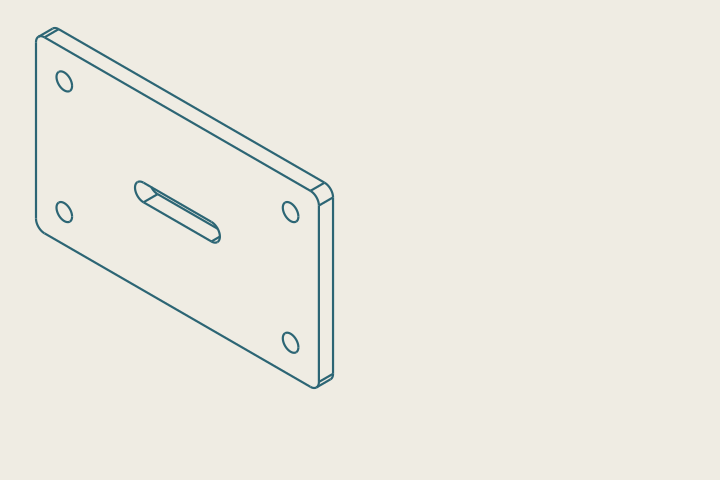
A text-to-CAD tool builds the solid from dimensions. In Cad Bot you type “slotted mounting plate 100x60x5 mm, 4x M5 clearance holes 80x40 apart, corners rounded r3” and the holes are there, at those positions, in a watertight STL and a STEP you can edit. It is limited to the parts in its catalog and says no to the rest. Try the text to STL tool, the gear generator, or image to STL for a logo or sign at an exact width.
Fixing an AI mesh before you slice
- Import into Blender and enable the 3D Print Toolbox add-on.
- Run Check All, then Make Manifold to close holes and broken edges.
- If parts are paper-thin, add a Solidify modifier (1–2 mm).
- Recalculate normals so the slicer knows inside from outside.
- Scale to final size, export STL or 3MF, and look at the sliced layer preview, not just the model view.
Sources
- Meshy: AI 3D printing · Meshy: fixing a hollow model · Meshy pricing
- Filament Feed: Meshy text-to-3D lands in MakerWorld · 3D Printing Journal: testing PrintU
- SkipTheCAD: Tripo for 3D printing
- Hitem3D 1536³ launch announcement
- Hyper3D Rodin pricing
- Zoo: Introducing Text-to-CAD · PrintMakerAI comparison (vendor)
- Neural4D: no independent printability benchmark (vendor)
- Formlabs: minimum wall thickness · Prusa: layers and perimeters
Questions about AI 3D generators for 3D printing
What is the best AI 3D model generator for 3D printing?
For figurines, miniatures and decorative prints, Meshy has the most print-specific tooling: watertight and non-manifold checks, automatic repair, multi-colour 3MF and slicer integrations. Bambu Lab owners can use the same engine inside MakerWorld's MakerLab. For functional parts that must fit, such as brackets, spacers, plates or bolts, use a text-to-CAD tool such as Cad Bot, Zoo or PrintMakerAI, because a mesh generator does not hold stated dimensions.
Can I print an AI-generated 3D model directly?
Sometimes, but plan to check it. AI meshes are often non-manifold, have holes, or are made of zero-thickness surfaces, which slicers read as hollow. Meshy's own help centre recommends Blender's 3D Print Toolbox (Make Manifold), a Solidify modifier and recalculated normals. Then scale the model to real size and check thin details against your printer's minimum wall.
How thin can details be on an AI model I want to print?
On FDM with a 0.4 mm nozzle, about 0.8 mm (two extrusion widths) is the practical minimum and 1.2 mm is safer for parts you handle. Formlabs recommends 1.0 mm minimum walls on SLA resin. AI generators do not know these limits, so fingers, wings, antennas and hair strands are where prints fail.
STL or 3MF for an AI model?
STL carries geometry only, so colour from the texture is lost. 3MF can carry colour regions and filament assignments; Meshy's multi-colour export opens with colours mapped in Bambu Studio, OrcaSlicer and PrusaSlicer. For single-colour prints either works.
Is there a free AI 3D generator for 3D printing?
Most have free tiers with limits. As of 5 October 2026 Meshy gives 100 credits a month with free-plan assets under CC BY 4.0; Tripo's free Basic plan makes models public; Bambu's MakerLab tools spend MakerWorld credits that are earned through activity on the site. Cad Bot gives 3 generations a day to signed-in users for catalog parts.